Hello again!
Visually there is nothing extraordinary about the auditorium that I made for "Work it Out", however the placement of the stage was a little tricky. It was only after several minutes of rebuilding the back wall and the stage did I realize that the stage cannot be against a wall. Experienced players and movie makers may believe my conclusion is too obvious and they may be right. I can't explain it, but for some reason it took me awhile to catch on to this method. Anyway, I used the deck tool to build a rectangular stage and placed a set of stairs at each end. Then I set up some chairs for the audience and decorated.
I ran into another problem when I realized that I needed a podium for the hosts. So, I bought a kitchen counter and put a table microphone on it that I downloaded from a custom content website. Of course after I built this magnificent podium and filmed the awards show scenes I realized that there is a podium in the career reward objects section. Oh well! You may recognize other career rewards objects in the video that I was able to use such as the obstacle course, punching bag, lie detector, and scanner. If you want the career rewards without reaching a high career level, press ctrl+shift+C then type unlockCareerRewards in the window.
I hope this was helpful! And as always ask any unanswered questions in the comment box.
Best wishes,
JakeT
Showing posts with label animation. Show all posts
Showing posts with label animation. Show all posts
Wednesday, July 2, 2008

Friday, June 20, 2008
Episode 3 --- "Work it Out"
Jakeysha is attending the Simanitarian Awards ceremony this week. She is being honored by her fellow Sims for her bravery and assistance during the takedown of the tough druglord, Mr. Big. Sit back and enjoy the lovely tribute and clips of Jakeysha working out and acting crazy.
Visit the Jak in the Box channel: http://www.veoh.com/channels/jaket
New episode every Friday. Subscribe!
Comments welcome!
Online Videos by Veoh.com
Visit the Jak in the Box channel: http://www.veoh.com/channels/jaket
New episode every Friday. Subscribe!
Comments welcome!
Online Videos by Veoh.com
Thursday, June 19, 2008
'Nique of the Week --- Sets and Special Effects
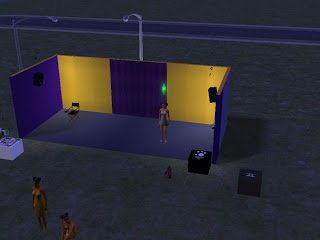
When I decided to film "Blue Magic" I wanted to experiment with making sets. I had made sets for "Roll it Gal" but in certain scenes you can see where I didn't position the camera correctly. For example, while Jakeysha is asleep on her couch after work you can see outside. The key to using sets is to remember your boundaries and keep the camera within those boundaries. The traditional shape for a movie set is an open box. Using build mode in The Sims 2 create a three-sided space. Then paint the walls, add a floor, and decorate if desired. TAH DA! You have just built a movie set. Pretty easy, right? Check out an example below:
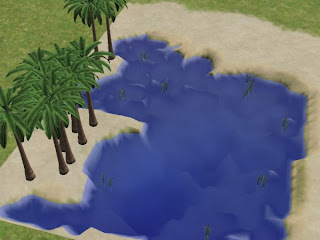
Now you're ready for more complex sets. The beach in the "Roll it Gal" video is an open set. I used the water tool to create a large water mass. In the floor category, there is a sand texture that i used to surround the water. I simply placed some palm trees in the background and I was done. Actually, a beach is easier to make than a traditional box set.
My favorite set, the city scene in "Blue Magic", was a little more annoying. The size of the headache depends on how big you want to make your city. If you want to film a big sweeping city shot (think CSI: Miami), I suggest that you consider using the Downtown neighborhood from the Nightlife expansion pack. If you don't have Nightlife or you only need a small strip of skyscrapers, then you are free to use my method. Basically, build a bunch of rooms with the wall tool then add a new layer. For variety, make buildings of different heights to look like a real skyline. Since my city scenes were shot at night, I decided to paint the buildings grey and just added some streetlights. You can't build across the street from your house so if you want a street you'll have to use the street flooring in build mode.
YEAH! Now we get to talk about the fun stuff --- Special FX! I haven't really experimented with special effects but one of my favorite scenes in "Blue Magic" uses the Sim Effects mod which can be found at insimenator.net along with other cool mods. The Sim Effects object (looks like a fire extinguisher in the electronics category) let's you add fire, soot, and sparkle to a Sim. In the last scene of "Blue Magic" I used the Sim Effects object to teleport Jay-Z and Pharell which provided the perfect background for the title.
And there you have it! If you have anymore questions feel free to leave a comment and I'll get back to you ASAP!

Now you're ready for more complex sets. The beach in the "Roll it Gal" video is an open set. I used the water tool to create a large water mass. In the floor category, there is a sand texture that i used to surround the water. I simply placed some palm trees in the background and I was done. Actually, a beach is easier to make than a traditional box set.

My favorite set, the city scene in "Blue Magic", was a little more annoying. The size of the headache depends on how big you want to make your city. If you want to film a big sweeping city shot (think CSI: Miami), I suggest that you consider using the Downtown neighborhood from the Nightlife expansion pack. If you don't have Nightlife or you only need a small strip of skyscrapers, then you are free to use my method. Basically, build a bunch of rooms with the wall tool then add a new layer. For variety, make buildings of different heights to look like a real skyline. Since my city scenes were shot at night, I decided to paint the buildings grey and just added some streetlights. You can't build across the street from your house so if you want a street you'll have to use the street flooring in build mode.
YEAH! Now we get to talk about the fun stuff --- Special FX! I haven't really experimented with special effects but one of my favorite scenes in "Blue Magic" uses the Sim Effects mod which can be found at insimenator.net along with other cool mods. The Sim Effects object (looks like a fire extinguisher in the electronics category) let's you add fire, soot, and sparkle to a Sim. In the last scene of "Blue Magic" I used the Sim Effects object to teleport Jay-Z and Pharell which provided the perfect background for the title.
And there you have it! If you have anymore questions feel free to leave a comment and I'll get back to you ASAP!
Friday, June 13, 2008
Episode 2 "Blue Magic"
Jakeysha is back home from her relaxing vacation, yet she cannot get any rest because a group of thugs sent by a druglord to find a thief grabs the wrong person. The only way she can survive is to go undercover and get them before they get her. You don't want to miss it!
Visit the Jak in the Box channel: http://www.veoh.com/channels/jaket
New episode every Friday. Subscribe!
Comments welcome!
Online Videos by Veoh.com
Visit the Jak in the Box channel: http://www.veoh.com/channels/jaket
New episode every Friday. Subscribe!
Comments welcome!
Online Videos by Veoh.com
Subscribe to:
Posts (Atom)